
CareCascade · For independent pharmacies
A Full-Featured Phone and AI Voice System for Pharmacies
Incoming and outgoing calls, staff routing, AI agents, voicemail, patient requests and call coaching—all in one system.
Talking points & details
A Full-Featured Phone and AI Voice System for Pharmacies
Part of CareCascade. Route each menu option to your staff or an AI voice agent, summarize general and personal voicemail, make outbound AI calls and score calls for coaching.
Staff answering with automatic overflow
Busy or unavailable? Send the call to smart voicemail or a live AI agent.
Talking points & details
Your staff answer first. When they’re busy, calls are handled automatically.
Your front desk is already helping a caller. The next call follows your overflow rule—without a staff member having to transfer it.
-
If available
Staff handles the call as usual
-
If busy or unavailable · automatic overflow
Option 1General or personal voicemail
Record → transcribe → summarize
How it works
The message is recorded, then automatically transcribed and summarized. Caller details are ready for follow-up.
Option 2AI voice agent answersAnswer → help → escalate
How it works
Speaks with the caller, handles routine questions or collects the request, and escalates to staff when needed.
Choose the overflow destination for each line or team.
Keep your human front desk. Add coverage when the team cannot pick up.
Phone trees and call routing
Choose who answers each menu option.
Talking points & details
Phone trees that send each option to your staff or an AI voice agent.
Build menus for the whole company. For every option, choose who answers, a person, a team or an AI voice agent, and which mailbox takes the call when no one can.
- 1Service questionsRoutine answersAnswered byAI voice agent When neededTransfer to staff
- 2BillingTeam lineAnswered byBilling team If no one answersGeneral voicemail
- 3Select a personStaff directoryAnswered byChosen staff member If no one answersPersonal voicemail
- 0Front deskEverything elseAnswered byFront desk staff If no one answersAI voice agent
Refill voicemail → patient request queue.
Name and Rx number extracted. Request ready for your team.
Talking points & details
A refill voicemail becomes a ready-to-review patient request.
The voicemail is transcribed and summarized. The patient’s name, Rx number and callback number are extracted into the patient request intake queue for staff review and further processing, with the original message attached.
“I need a refill.”
“Hi, this is Jane Doe. I’d like a refill on prescription 482731. Please call me at 202-555-0147 when it’s ready. Thank you.”
No retyping the message.
- Patient name
- Jane Doe
- Rx number
- 482731
- Request
- Prescription refill
- Callback
- 202-555-0147
Refill request · Jane Doe
New · Awaiting staff review- Rx number
- 482731
- Callback
- 202-555-0147
Summary: Patient requests a refill and a call when ready.
Transcript + recording attached.
Ready for pharmacy staff to process.
Illustrative pharmacy workflow · fictional patient information. Staff verify the patient and prescription before processing; this is a request, not a refill approval.
Product screenshots & additional voicemail workflows
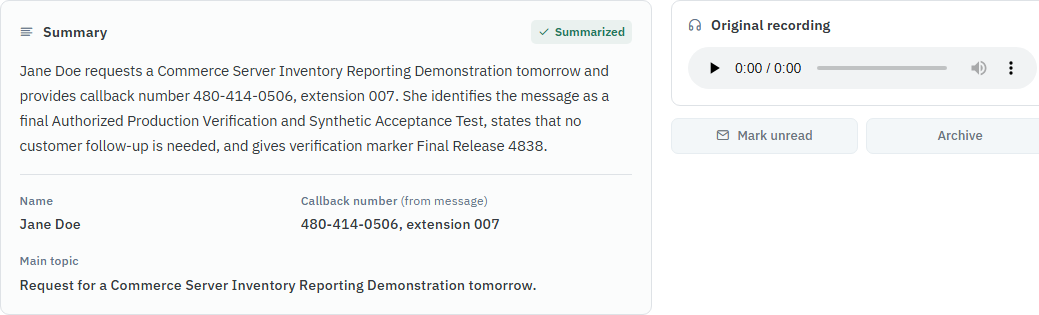
These existing product screenshots show a general demonstration. The pharmacy-specific workflow is illustrated above.
Shared by a team, like Billing
One staff member’s messages
- Transcript
- Summary
- Name, callback number, topic
- Original recording
Callback number and topic in hand
For routine requests you choose
Swipe sideways or tap Enlarge.
- 1Summary
- 2Caller details
- 3Original recording
Screenshot talking points
Summary: Know what the caller wants without replaying the message.
Caller details: Name, callback number and topic, ready for follow-up.
Original recording: The actual message, right beside the summary.
Product screenshots show synthetic demo data. Diagrams are illustrative.

Swipe sideways or tap Enlarge.
- 4Transcript
Screenshot talking points
Transcript: The conversation in writing, one click away.
Said once in the message. Captured as caller details.
Prescription pickup and delivery calls
Notify patients. Confirm delivery details. Record the outcome.
Talking points & details
Prescription pickup and delivery calls
Use AI voice agents or pharmacy staff to notify patients when a prescription is ready, confirm delivery details and follow up on uncollected prescriptions. Record the patient’s response and route requests or changes to the pharmacy team, alongside the recording, transcript and summary.
Your prescription is ready.
“Your prescription is ready for pickup. Do you plan to pick it up, or would you like the pharmacy to contact you about delivery?”
Patient: “I’ll pick it up tomorrow.”
Pickup planned · Tomorrow
Capture the response so staff know the patient’s plan.
Confirm the address before delivery.
“We’re calling to confirm your delivery details. What address should we use, including the apartment number? Are there any delivery instructions?”
Patient: “24 Oak Street, apartment 2B. Please use the side entrance.”
Delivery details · Ready for staff review
Extract the address, apartment and delivery instructions for the pharmacy team.
Call outcomes & additional pharmacy uses
Pickup: Log the planned pickup, a delivery request or a request for a staff callback. Delivery: Capture the confirmed address and instructions; route changes to staff for review before dispatch. No answer: Record the attempt and queue a retry or staff follow-up. The same workflow can handle uncollected-prescription reminders, refill-request callbacks and vaccination appointment confirmations.
Illustrative conversations with fictional information. The excerpts begin after patient verification; pickup calls use the pharmacy’s confirmed ready status. Medication questions go to pharmacy staff.
- Prescription ready for pickup
- Confirm delivery address
- Uncollected prescription reminder
Notifies patients and confirms pickup or delivery details.
Handle questions and requests that need your team.
- Pickup plan or delivery details
- Requests routed for follow-up
- Recording, transcript and summary
- Call scoring for quality review
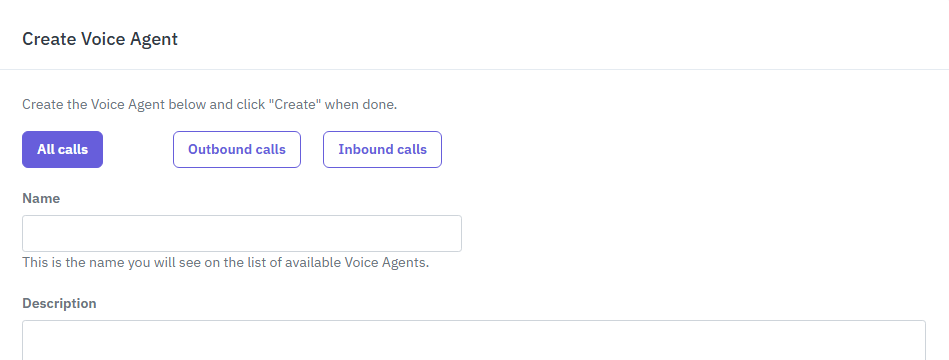
Swipe sideways or tap Enlarge.
One agent setup for inbound, outbound or both.
- 1Pick the direction
- 2Describe the job
Screenshot talking points
Pick the direction: All calls, outbound only or inbound only.
Describe the job: Name the agent and tell it what each call is for.
Pharmacy call scoring and staff coaching
Review a refill-status call, identify what was missed and show a better response.
Talking points & details
Coach the calls your pharmacy handles every day.
Use a refill-status call to review whether the patient’s question was answered, the status was checked and a clear next step was given. TIM scoring connects each rating to the actual words and gives the staff member a specific improvement.
Patient: “I called for a refill yesterday. Is it ready to pick up?”
“We’re busy. Try again later.”
The patient still doesn’t know the prescription status—or what happens next.
Acknowledge. Check. Explain.
“I can help check that. Let me verify your information and look up the prescription. Then I’ll explain its status and the next step.”
“We’re busy” focuses on the pharmacy, not the patient. Start with “I can help check that.”
No status check is offered. Verify the patient and prescription, then check the record.
“Try again later” leaves it unresolved. Explain the verified status and who will follow up.
Illustrative pharmacy coaching example · ratings shown for this excerpt, not a live patient call.
See the scoring and coaching product screens

Swipe sideways or tap Enlarge.
- 1What was said
- 2The context
- 3Rating and coaching
- 4Better alternative
Screenshot talking points
What was said: The exact words from the call.
The context: What the other person had just said.
Rating and coaching: Why it worked, or what to change.
Better alternative: What to say next time.

Swipe sideways or tap Enlarge.
- 5Skill
- 6Score
- 7Evidence
- 8Improvement
Screenshot talking points
Skill: The behavior being measured.
Score: Shown here: a four-point scorecard.
Evidence: The moments in the call behind the score.
Improvement: One concrete thing to do differently.
One phone system for callers, staff and managers.
Callers
Get routine answers or a clear path to the right person.
Staff
Spend less time on routine questions and manual notes. Review the summary and callback details together.
Managers
Scored calls with evidence, so coaching starts from real conversations.
More than an AI phone system.
Phone handling, automation and broader support—together.
Talking points & details
More than an AI phone system.
CareCascade includes call-center software and AI voice agents, plus your website, patient communication and FairPath support.
- Phone trees + staff overflow
- Inbound + outbound AI agents
- Transcripts + caller details
- Call scoring + coaching
- Website + patient communication
- FairPath software + support
Compare all 13 included capabilities
| Capability | Other AI phone systems | CareCascade |
|---|---|---|
| Phone handling & AI | ||
| Phone trees that send each option to staff or an AI agent | Varies by providerCompare the capabilities included. | Included |
| Staff answer first, with automatic overflow to voicemail or an AI agent | Included | |
| General and personal voicemail | Included | |
| Transcripts, summaries and captured caller details | Included | |
| AI agent handling and configured follow-up actions | Included | |
| Outbound AI voice agents | Included | |
| Call scoring and coaching | Included | |
| Beyond the phone system Broader CareCascade services included in the same plan | ||
| Managed website | Compare broader services | Included |
| Patient communication | Included | |
| Other standard AI bots and automation | Included | |
| Content, local search and reputation | Included | |
| Reporting and support | Included | |
| FairPath clinical-program software, with setup, training, enrollment, documentation and billing-preparation support | Included | |
What this brings together
Business phone routing, AI voice agents, call quality review and follow-up automation, alongside website and reputation services. CareCascade pairs AI agents with your own team—not an outsourced receptionist service.
See what CareCascade would replace for your locations.
Request a no-obligation, 20-minute CareCascade business review of your phone setup, tools and workflow.
- Review your current phone, website and software tools
- Map your phone tree, voicemail and voice agents
- See how CareCascade connects it all